Mobile and desktop apps

Apps for phones, desktops and kiosks, and the control panel to run them.

Plenty of studios can build an app. We also give your team the control panel behind it, so you change what the app shows, preview it and publish it to every device without waiting on a new release. For iPhone and Android, Windows and Mac, and locked-down kiosks.

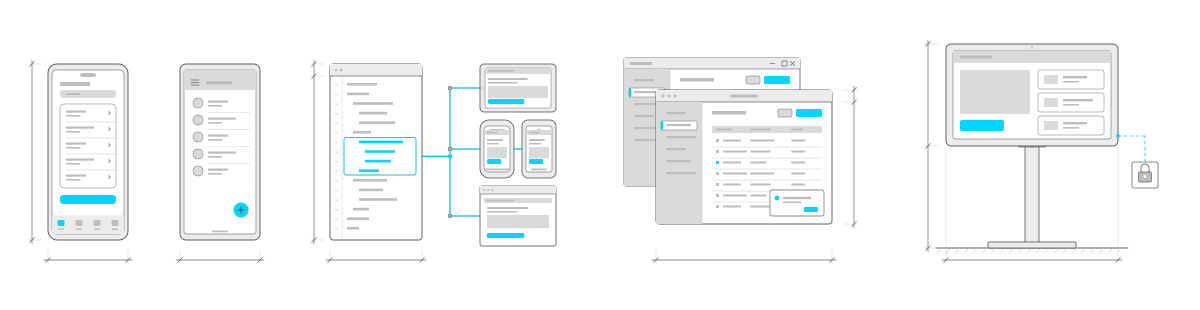
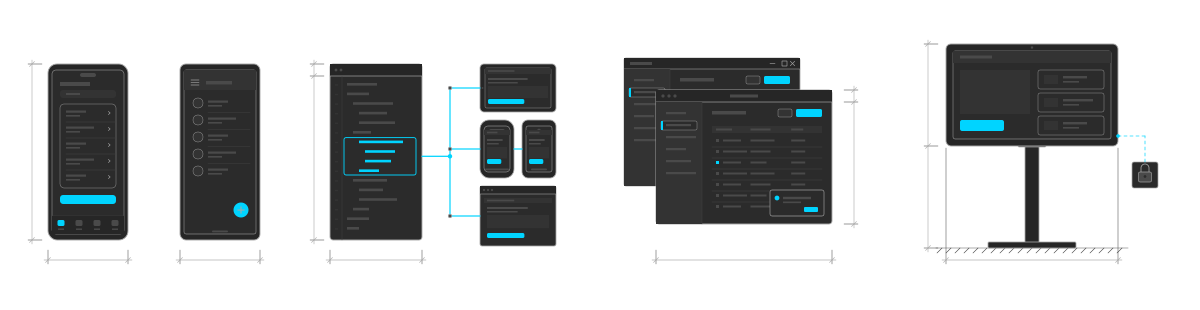
Four kinds of app drawn from left to right: the same app as two native builds, an iOS phone with a large title, grouped list and tab bar beside an Android phone with a top app bar, list and a cyan floating action button; one code panel with a widget outlined in cyan and wired through a bus to a tablet, two phones and a desktop window that each show the same cyan button; a Mac-style desktop window in front of a Windows-style one, a sidebar app with a table of records and an update card in the corner; and a landscape tablet in an enclosure on a floor stand running one full-screen app, with a padlock callout on a dashed cyan leader.Four kinds of app drawn from left to right: the same app as two native builds, an iOS phone with a large title, grouped list and tab bar beside an Android phone with a top app bar, list and a cyan floating action button; one code panel with a widget outlined in cyan and wired through a bus to a tablet, two phones and a desktop window that each show the same cyan button; a Mac-style desktop window in front of a Windows-style one, a sidebar app with a table of records and an update card in the corner; and a landscape tablet in an enclosure on a floor stand running one full-screen app, with a padlock callout on a dashed cyan leader.
NativeCross-platformDesktopKiosk

What we build

App development, from a phone in the field to a tablet bolted to a counter.

Everything here is something we have built and shipped, for a client or for our own software. Take the parts you need.

Two ways in

Native for each platform, or one codebase for all of them.

Both are custom builds. Which one fits is settled in the prototype, from what the app has to do, where it runs and what the budget is. If you already have an app, we review it with you and plan the next step.

Route 1 · Native

A native app for each platform

A separate app for iPhone and Android, built with each platform's own tools. The right call when the app leans hard on the device, when it only needs to exist on one platform, or when the apps have to behave differently enough that shared code would save little. Two platforms means two builds, which is the cost of going native.

  • Separate iPhone and Android apps
  • Each platform's own tools and conventions
  • Everything the device offers, as the platform intends
  • Two platforms, two builds
Start a native build

Route 2 · Cross-platform

One codebase for every platform

One codebase for iPhone and Android, or for Windows and Mac. For phones and tablets we recommend Flutter, Google's toolkit for building one app that runs on both. Most of the work is done once, and a change ships to every platform at the same time. Each app follows its platform's design conventions, so it still looks like it belongs, and a desktop app can share its code with your web app.

  • iPhone and Android from one codebase, with Flutter
  • Windows and Mac installers from one codebase
  • Each platform's look and feel
  • One change, released everywhere at once
  • Shared code with your web app where there is one
Ask about one codebase

How a project runs

Prototyped, designed, developed and released, then kept current on every device.

Behind the app, we recommend designEdit as its control panel: sign-in, accounts, permissions, approvals and the API come ready, so your budget goes further and your team runs the content from day one. If you need a fully custom backend, or already have one, we build on that instead.

  1. Prototype

    What the app has to do, who uses it and where: in a store, in the field, at a desk. A blueprint and a working prototype of the main path, so we agree on the platforms and the approach, and you have a price before we start.

  2. Design

    The screens in your brand, following the conventions of iPhone, Android, Windows or Mac so the app feels at home on each. We work with your designers, or with a design firm that fits the project.

  3. Develop

    The app, its backend and the tools your team will use, built in stages you can try on your own phones, tablets and computers as it comes together.

  4. Release

    Through the App Store and Google Play, as Windows and Mac installers, or loaded onto locked-down devices. Then supported on terms we agree with you, with updates as the platforms change.

Start where you are. If you already have a blueprint, wireframes or finished designs, we review them with you and pick up from there instead of starting again. Tell us what you have.

What we have built

Sales reps on the road and tablets in stores.

Retail and telecom
Rogers Ignite TV
A product demo for retail stores and field sales reps, released from one codebase as a progressive web app, an iPhone app and Windows and Mac desktop apps. It works offline with push notifications, and designEdit manages its accounts, usage tracking and every text, image and video, with each new version previewed before it goes out to all devices.
Events and retail
Rogers Command and Answer
An interactive game on Android tablets locked in kiosk mode, first at the Canadian National Exhibition and then in retail stores, capturing entries offline and syncing them when the connection returned. Staff update the questions in designEdit and push them to every tablet once approved.
Software products
designEdit
Our own framework for building business software, and the control panel behind both apps above.

Client names are used with permission. Apple, iPhone, App Store, Google, Android, Google Play, Flutter, Microsoft, Windows, Mac, Amazon Web Services (AWS) and Rogers are trademarks of their respective owners. Design of a Decade is an independent studio and is not affiliated with or endorsed by Apple, Google, Microsoft or Amazon.

Questions

What clients ask before an app build.

Do we need an app, or would a web app do?

Not always an app. A progressive web app installs from the browser, works offline and sends push notifications, with no app store review. A native or cross-platform app makes sense when you need the app stores, deeper use of the device, or a desktop or kiosk install. We build both and will tell you which fits.

Native or one codebase: which should we choose?

One codebase usually costs less and keeps every platform in step, and for it we recommend Flutter. Native fits when the app leans hard on the device or only needs one platform. The prototype settles it.

Can we change the app without a new release?

Yes, for content. With designEdit behind the app, your team changes text, images, video and settings, previews the new version and, once it is approved, publishes it to every phone, tablet, desktop and kiosk at once. Earlier versions stay in the history. New features still go out as an app update.

Who on our team can change the app's content?

Anyone you give a role to. designEdit has roles and per-app access, so one person can draft a change while another approves what goes live. Every edit, role change and sign-in is kept in an activity trail, so you can see who changed what and when. Content can also be kept in more than one language.

What does an app cost?

It depends on the platforms, what the app has to do and what it connects to. The blueprint and prototype work that out, and you have a price for the build before you commit to it. If you already have a blueprint or designs, we price the build from those instead.

Who publishes the app to the App Store and Google Play?

Whichever suits you. Your team can publish it, or we take care of it for you, from the store listings to each store's review.

What happens after launch?

Apple, Google and Microsoft update their systems every year, so an app needs regular updates to keep working. Support carries on for as long as you want it, on terms we agree with you: updates, new features and hosting for the backend.

Where will the backend be hosted?

We usually recommend AWS. It has a managed service for almost everything, and with its serverless options there are no servers to patch or look after: the backend scales up for a rush, back down afterwards, and you pay for what is used. But it's your call: we also work with other cloud providers, your own servers or the hosting you already have, in the region you choose.

Can you take over an app someone else built?

Yes. We start with a review of what you have. Most of the time we work in what is there, and when it's time to replace it, we do it in stages.

What happens if we stop working with you?

You keep running what we built. We work with you to choose the licence model that fits, whether you want us to keep looking after it or plan to take it in-house.


Planning an app for phones, desktops or kiosks?

Tell us about it.

You don't need everything worked out. Send us a rough idea or a full spec, and we'll reply within one business day.

info@designofadecade.com

+1 647.409.1479

Burlington, Ontario